REUSE(dyn.array.expr)
Description
The UniBasic REUSE function affects the application of arithmetic operations on dynamic arrays.
When REUSE Is Not Used
When you execute an arithmetic operation on an array and you do not include the REUSE function, one of the following happens:
■Array and constant – When you apply an arithmetic operation to an array and a constant, the operation is executed against only the first element of the array. If you want the operation to execute on every element in the array, apply REUSE to the constant.
■Two arrays – When you execute an arithmetic operation on arrays of different lengths, the operation is performed on the number of elements in the shortest array only. The remaining elements are each filled with 1 or 0, depending on the operation performed:
■Division – 1.
■Addition, subtraction, and multiplication – 0.
If you apply REUSE to the shorter array, the last element in this array is used to perform the operation on the remaining elements in the longer array.
1-690 UniBasic Commands Reference
Examples
In the following example, the program segment multiplies the arrays without using the REUSE function:
VIEWERS = 100:@VM:200:@VM:300
COST = 40:@VM:1
VCOST = VIEWERS*COST
This results in:
VCOST = 4000:@VM:200:@VM:0
VCOST takes its length from VIEWERS, the longest of the two arrays, but multiplication is performed on only the first two elements of each array because the other array, COST, has only two elements. The final element in the result array (VCOST) is filled with 0. 0 is used to fill because the arithmetic operation is multiplication.
However, if you apply the REUSE function to the shorter array:
VCOST = VIEWERS*REUSE(COST)
This results in:
VCOST = 4000:@VM:200:@VM:300
The final element in COST (1) is used to multiply with the final element of VIEWERS and fill the final element of the result array, VCOST.

Subscribe to:
Post Comments (Atom)
如何发掘出更多退休的钱?
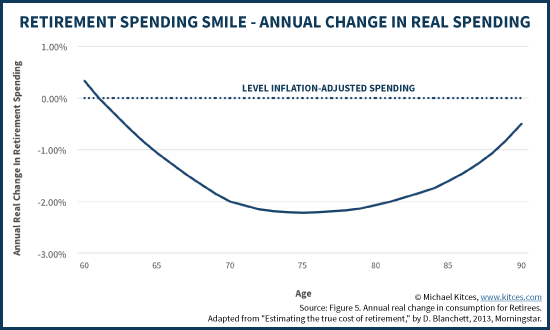
如何发掘出更多退休的钱? http://bbs.wenxuecity.com/bbs/tzlc/1328415.html 按照常规的说法,退休的收入必须得有退休前的80%,或者是4% withdrawal rule,而且每年还得要加2-3%对付通胀,这是一个很大...
-
魏杰教授这篇演讲,深入浅出,把未来几年的经济形势讲的非常透彻。 魏杰:我和大家一起对未来一段时间做一个交流,可能在座的知道从2018年3月份开始,中国社会生活出现了六个很严重的现象。 第一个现象 ,大量的中小企业反映企业非常难做,压力很大。既有成本压力,也有资金...
-
如何发掘出更多退休的钱? http://bbs.wenxuecity.com/bbs/tzlc/1328415.html 按照常规的说法,退休的收入必须得有退休前的80%,或者是4% withdrawal rule,而且每年还得要加2-3%对付通胀,这是一个很大...
-
关于开户炒股 关于开户炒股(ZT) 去自己的银行询问怎么开设股票投资账户,很简单,贴个表,签个字就搞定了,没有任何费用,然后再到指定的网上操作一遍,签订个real-time的 quote协议(也是免费)就可以再网上看到实时行情并下单交易了,如果现自己的银行不专业,加拿大最快的就是...

No comments:
Post a Comment